

AI Applicant Ranking helps you quickly identify qualified candidates by automatically scoring applicants against criteria generated from your job posting.
When enabled, the AI analyzes your job title and job description to create weighted ranking criteria. As applicants apply, their resumes are evaluated against these criteria and assigned a match score, helping you prioritize candidate review more efficiently.
AI Applicant Ranking is designed to support your screening process, not replace it. Hiring decisions should always include a thorough review by a qualified hiring manager.
Before You Begin
To use AI Applicant Ranking:
Your account must have access to the AI Applicant Ranking feature.
The job posting must include a job description containing at least 200 characters.
Ranking criteria must be configured before applicants can receive scores.
Setting Up AI Applicant Ranking
You can configure AI Applicant Ranking while creating a new job or editing an existing one.
Step 1: Open AI Applicant Ranking
Navigate to the job posting.
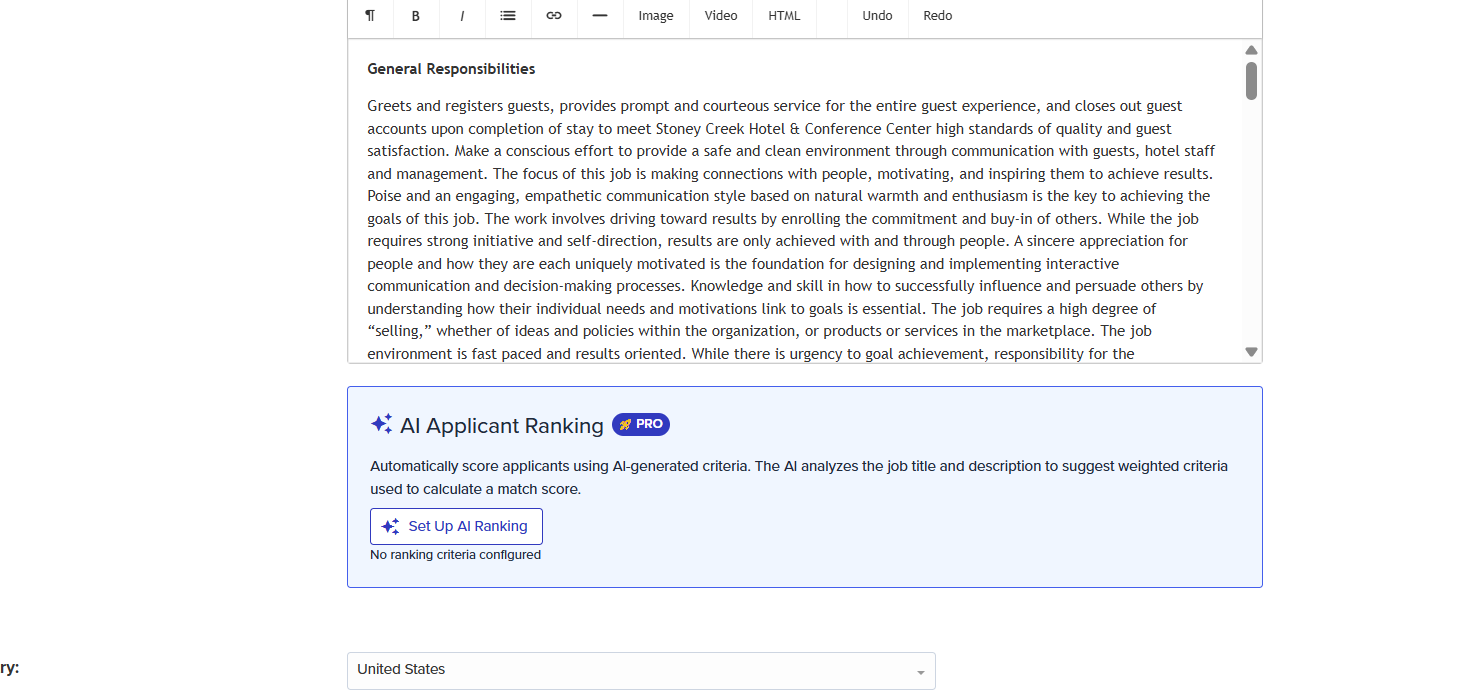
Locate the AI Applicant Ranking section just below the job description.
Click Set Up AI Ranking.
The AI will analyze the job title and description and generate recommended ranking criteria.
Step 2: Review AI-Generated Criteria
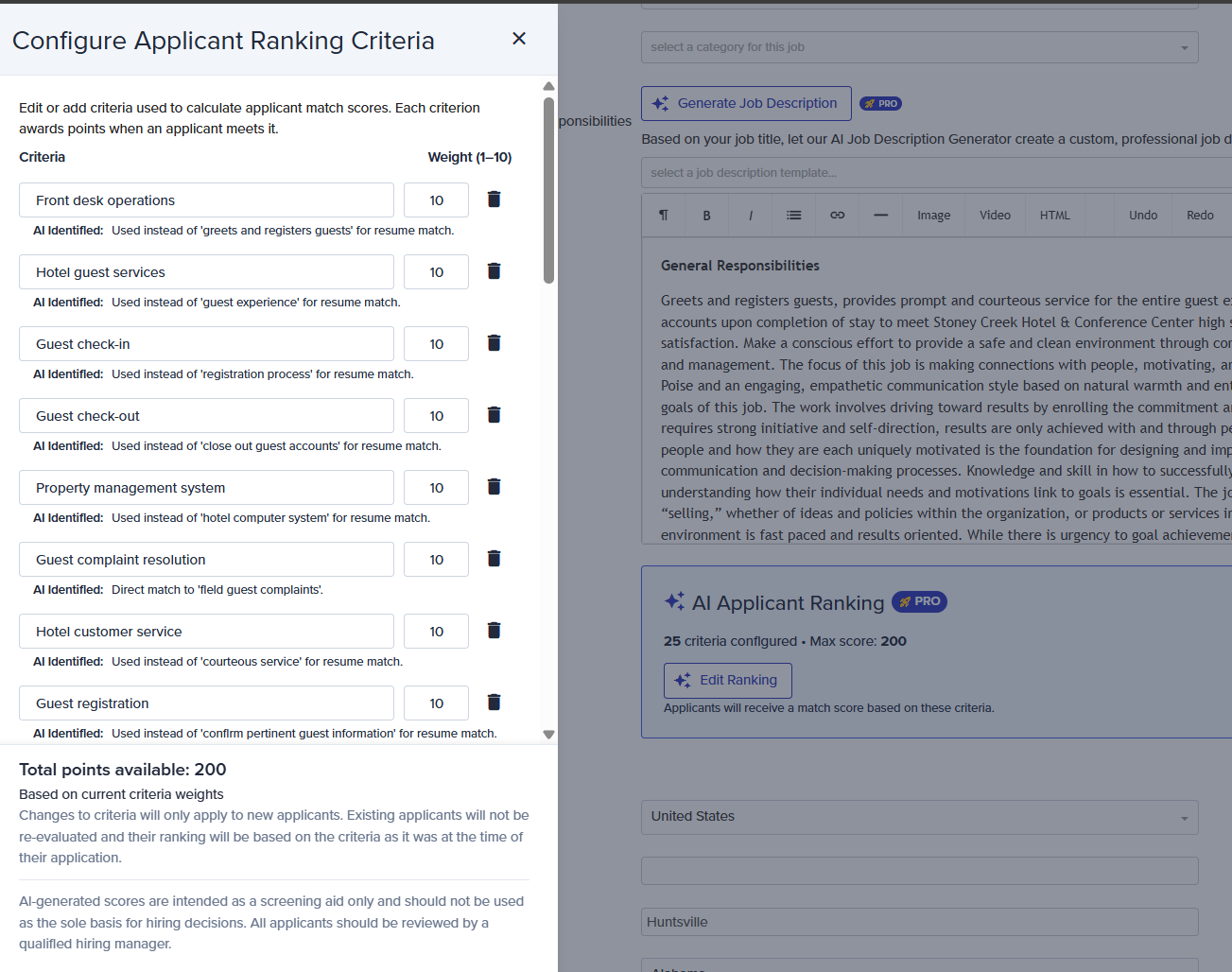
The system generates criteria based on the skills, qualifications, and experience identified in your job posting.
For each criterion, you'll see:
The criterion name
A weight value between 1 and 10
An AI explanation describing how the criterion was identified
Higher-weighted criteria contribute more points toward an applicant's overall score.
For example, a criterion weighted at 10 will have a greater impact on the final score than a criterion weighted at 5.
Step 3: Customize the Criteria
You can modify the generated criteria to better match your hiring requirements.
How criteria evaluation works
When writing or editing criteria, you are not limited to simple keyword matches. The AI accepts complex, multi-condition logic — for example, "experience with at least one cloud platform and two years of team leadership." It also evaluates across related terms and equivalent platforms rather than relying on exact text matches, so a criterion referencing cloud platforms, for instance, can account for experience listed as AWS, Azure, or Oracle without requiring you to create separate criteria for each.
This means your criteria can be written naturally and specifically, without worrying about every possible variation in how candidates describe their experience.
Available options include:
Edit an existing criterion
Change a criterion's weight
Delete a criterion using the trash can icon
Add a new criterion manually
Remove all criteria using Clear All
Criteria Limits
AI Applicant Ranking can generate up to 25 criteria automatically.
Additional criteria can be added manually.
A maximum of 50 total criteria can be configured for a job.
This flexibility allows you to combine AI recommendations with your organization's specific hiring requirements.
Step 4: Configure Match Score Thresholds
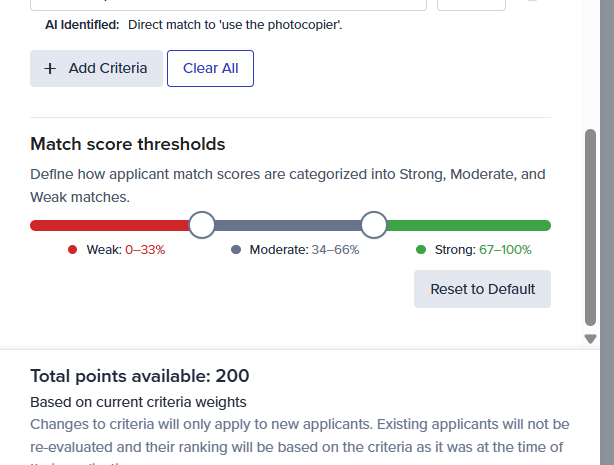
At the bottom of the configuration window, you'll find the Match Score Thresholds section.
These thresholds determine how applicant scores are categorized:
Weak Match
Moderate Match
Strong Match
Use the slider controls to adjust the score ranges that define each category.
If you want to return to the system defaults, click Reset to Default.
Step 5: Save Your Configuration
Once your criteria and thresholds are configured:
Click Done to navigate back to your job posting.
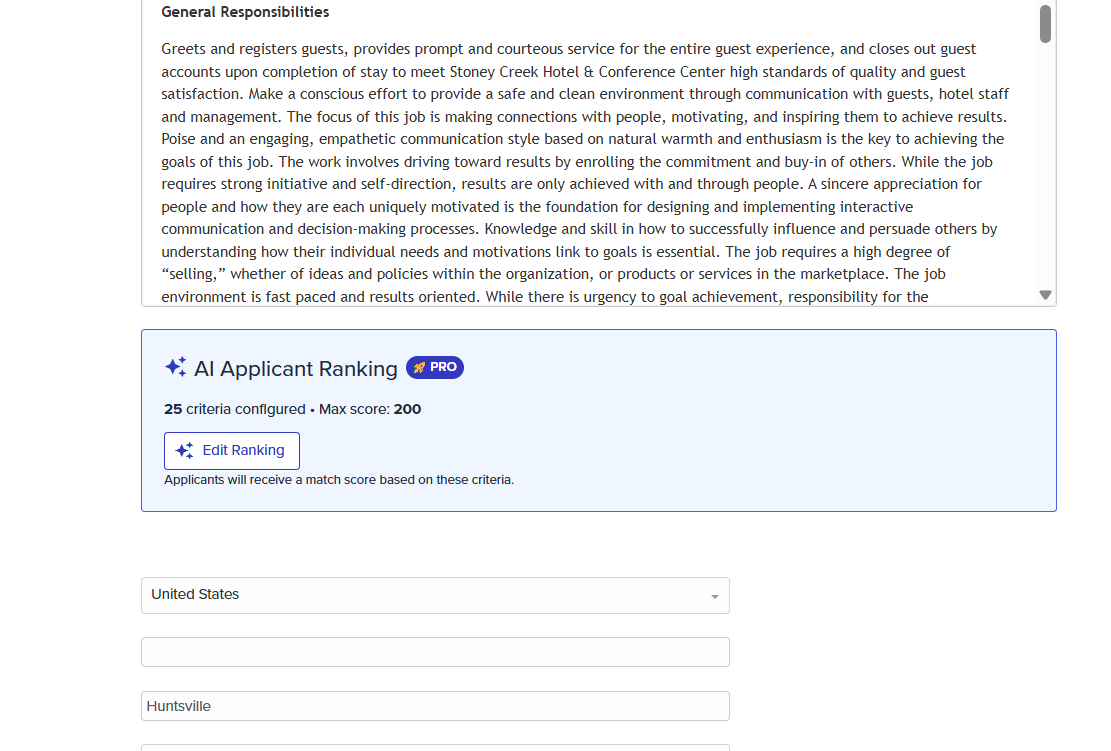
The AI Applicant Ranking section will display:
The number of configured criteria
The maximum available score
Confirmation that applicants will be scored using the configured criteria
How Applicant Scoring Works
After AI Applicant Ranking is configured and the job is published:
New applicants submit their applications.
The AI reviews the applicant's resume.
Resume content is compared against the configured ranking criteria.
Points are awarded for matching qualifications.
The system calculates:
A total point score
A percentage match score
A match category (Weak, Moderate, or Strong)
The final score is based on the weighted value assigned to each criterion.
Viewing Applicant Ranking Results
To review an applicant's ranking details:
Click on the relevant job from your dashboard.
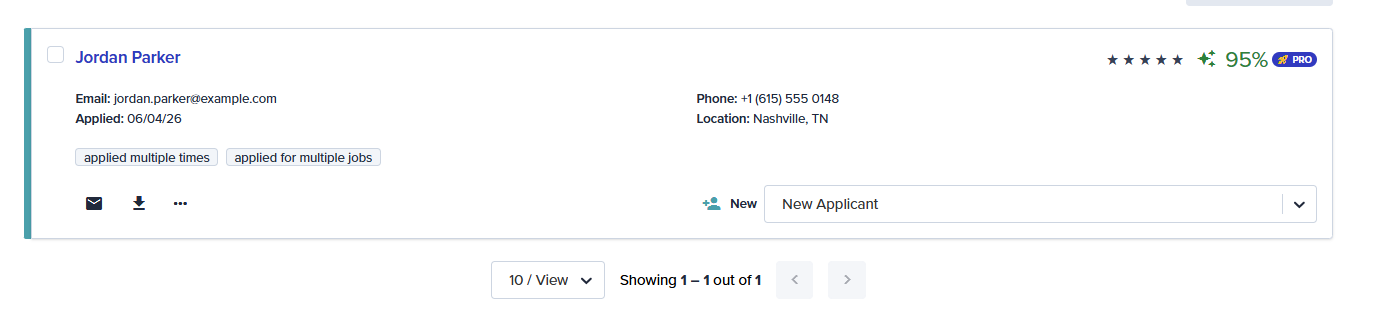
The AI Applicant Ranking will first be displayed directly on the job card in the grid.
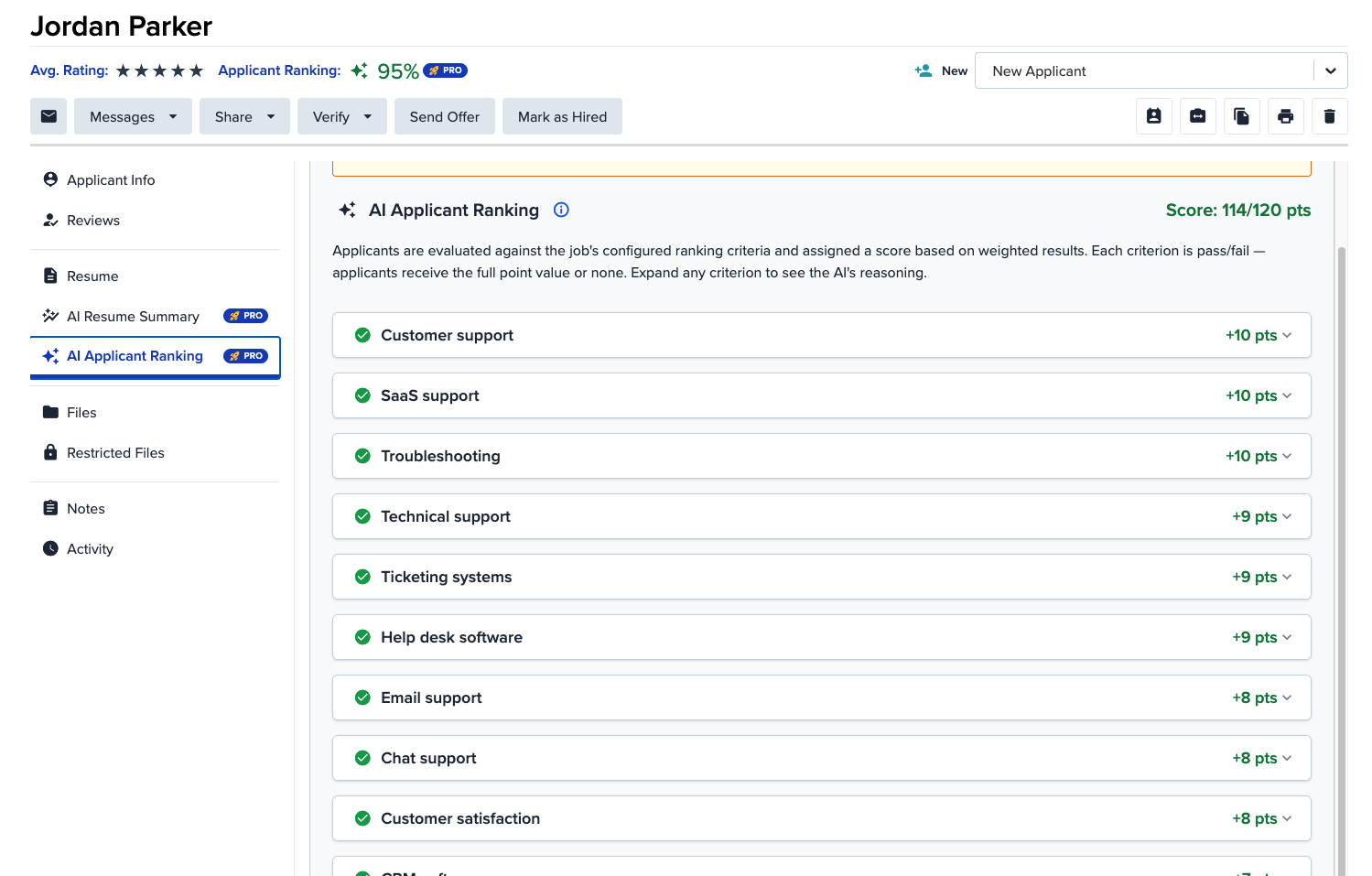
Once you open an applicant's profile, select AI Applicant Ranking from the left side menu.
Review the overall score displayed at the top of the page.
Expand individual criteria to view detailed scoring information.
The ranking breakdown shows:
Total points earned
Maximum possible points
Individual criterion scores
AI reasoning behind each awarded score
Supporting resume evidence used during evaluation
This detailed breakdown helps you understand how the applicant's score was calculated.
Understanding Score Categories
Applicant scores are grouped into categories based on the thresholds configured for the job.
Depending on your settings, applicants may be identified as:
Strong Match – Closely aligned with the job requirements.
Moderate Match – Meets some of the desired qualifications.
Weak Match – Limited alignment with the configured criteria.
These categories help prioritize applicant review but should not be used as the sole basis for hiring decisions.
Important Notes
Changes Apply to Future Applicants Only
If you update ranking criteria after applicants have already applied:
New applicants will be scored using the updated criteria.
Existing applicants will not be automatically re-evaluated.
Existing scores remain based on the criteria that were active when the application was submitted.
AI-Assisted Evaluation
AI Applicant Ranking is intended as a screening aid only.
While AI can help identify relevant skills and qualifications, it should not replace human judgment during the hiring process.
All applicants should be reviewed by a qualified hiring manager before making hiring decisions.
Best Practices
For the most effective results:
Write detailed job descriptions.
Include required skills, certifications, and experience.
Review AI-generated criteria before publishing the job.
Adjust weights to reflect the importance of specific qualifications.
Add custom criteria for role-specific requirements.
Use applicant rankings as a prioritization tool rather than a final hiring decision.
Following these practices helps improve scoring accuracy and candidate matching.
If you have questions about AI Applicant Ranking or need assistance configuring your ranking criteria, please contact our support team. We're always happy to help.
